
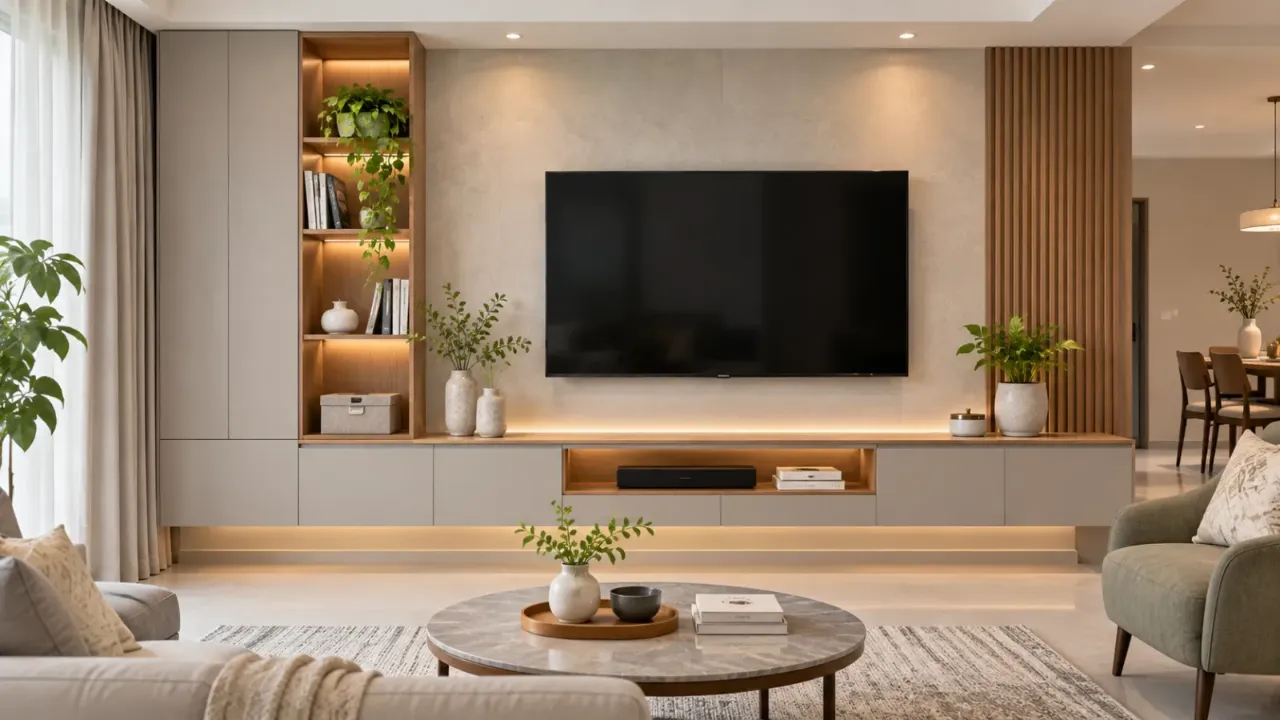
How to Design a TV Unit That Looks Good and Works Well
A TV unit often becomes one of the most noticeable features in a living room. It can provide storage, organise entertainment equipment and create a visual anchor for the space. But a design that looks attractive in a reference image may not work equally well in an actual home.
The screen may be mounted too high, the console may look too narrow, cables may remain visible, or closed cabinets may leave insufficient ventilation for electronic equipment. These issues are easier to prevent when the TV unit is planned around the room, the television and the household's everyday needs.
Here are the important details to consider before finalising your TV unit design.
1. Start with the Television and Viewing Position
The television should determine the starting dimensions of the TV unit, not the other way around.
Before choosing a panel or console, confirm:
- The television's screen size and actual width.
- Whether it will be wall-mounted or placed on a stand.
- The approximate distance between the screen and the seating.
- The usual eye level of people watching while seated.
- Whether the screen will be viewed from more than one seating position.
A useful starting point is to position the centre of the screen close to seated eye level. The ideal height depends on sofa height, viewing posture and screen size, so avoid copying a fixed mounting height from another home.
Also consider glare from windows and reflections from decorative lighting. A beautiful TV wall will be less comfortable if daylight or ceiling lights reflect directly on the screen.
2. Get the Proportions of the TV Unit Right
The relationship between the television, console and surrounding wall is one of the most important parts of the design.
A console that is too short can make a large television appear visually unbalanced. An oversized unit can overwhelm a compact living room or reduce valuable circulation space.
Consider these points:
- Console width: A console that extends beyond the television on both sides often creates a more balanced appearance. The amount of extension should suit the wall and furniture rather than follow a rigid measurement.
- Console depth: Choose enough depth for the equipment and storage you actually need, without projecting too far into the room.
- Panel size: The backdrop should frame the television without making the wall feel unnecessarily heavy.
- Vertical balance: Avoid placing the screen so high that it dominates the upper part of the wall.
- Wall clearance: Account for switches, sockets, windows, doors and nearby furniture before finalising the overall composition.
For a small living room, a slim floating console and a restrained backdrop may work better than a full-height feature wall. A larger room may accommodate a wider console, side storage or a combination of open and closed shelving.
3. Plan Storage Around What You Actually Own
Storage should be designed around the devices and objects that will use the unit. Otherwise, the finished furniture may look neat but prove inconvenient.
Make a list of the items you intend to keep in or around the TV unit:
- Set-top box and streaming devices.
- Gaming consoles and controllers.
- Soundbar or other audio equipment.
- Remote controls and accessories.
- Books, board games and everyday living-room items.
- Decorative objects.
Use closed cabinets for items that you do not need to access frequently. Open shelves can work for frequently used devices and selected display pieces, provided they do not become cluttered.
Drawers are useful for small accessories, while adjustable shelves offer flexibility when equipment changes. If you need to store larger items, check the internal dimensions rather than relying only on the external cabinet size.
4. Make Cable Management Part of the Design
Visible cables can make even an expensive TV unit look unfinished. More importantly, poorly planned wiring can make it difficult to add, replace or repair equipment later.
Cable management should be considered before the wall panels and cabinets are installed.
Plan for:
- Power sockets close to the television and equipment locations.
- Suitable cable routes between the TV, console and connected devices.
- Separate, clearly planned routes for power and signal cables where appropriate.
- Accessible openings or removable panels for maintenance.
- Enough space for connectors and cable bends behind the television.
- Additional capacity for devices you may add later.
Conduits can help conceal cables inside or behind the wall treatment. However, they should be sized for the actual cable requirements and should not be sealed in a way that makes future access impossible.
5. Allow Ventilation for Electronic Equipment
A cabinet may look clean from the outside but become a problem if equipment inside it overheats.
Set-top boxes, gaming consoles, routers and other electronic devices need suitable airflow. Enclosed compartments should therefore be designed around the equipment manufacturer's ventilation requirements.
Practical ways to improve ventilation include:
- Open-backed or ventilated compartments where suitable.
- Ventilation slots in cabinet doors or panels.
- Adequate clearance around devices.
- Keeping equipment away from heat-producing appliances.
- Avoiding tightly packed shelves.
Do not assume that leaving a small gap around a device is always sufficient. Check the manufacturer's instructions, especially for gaming consoles and other equipment that produces more heat.
6. Choose Materials That Suit the Room and Daily Use
The TV unit is a frequently used piece of furniture, so the material should be selected for both appearance and maintenance.
Laminates
Available in many colours and textures, laminates are a practical option for cabinet surfaces and can be easier to maintain.
Veneer
Veneer offers the natural appearance of wood, but the finish and protective coating need to suit the expected use.
Painted or PU Finishes
These create a smooth, contemporary appearance. Their long-term performance depends on the product quality and care.
Wooden Panels and Fluted Finishes
These add texture and warmth, but excessive detailing can make a small wall feel busy.
Stone-Look Surfaces
Stone-look surfaces can create a refined backdrop, but the weight, installation method and overall cost should be considered.
Choose a finish that complements the flooring, sofa, wall colour and other furniture. A TV unit does not need to introduce several new materials to stand out.
7. Balance Open Shelves and Closed Cabinets
Open shelving adds visual interest and makes frequently used items accessible. Closed storage hides equipment, accessories and everyday clutter.
The right balance depends on how much storage the household needs.
A simple approach is to use closed cabinets for most everyday storage, with a limited number of open shelves for selected objects. If the TV unit already has a textured or detailed backdrop, keep the shelving relatively simple.
Avoid filling every shelf with decorative pieces. Leaving some empty space helps the overall design feel more organised.
8. Use Lighting Carefully
Lighting can highlight the TV wall, but it should not interfere with screen viewing.
Consider soft, indirect lighting around selected panels or shelves. Under-shelf lighting can help display objects, while subtle backlighting may add depth to a plain wall.
Keep these precautions in mind:
- Avoid placing bright light sources directly opposite the screen.
- Use diffused lighting rather than exposed, glaring strips.
- Provide access to LED drivers and connections.
- Plan lighting controls and electrical points before installation.
- Keep decorative lighting secondary to the room's main lighting.
A well-lit TV wall should feel integrated with the living room rather than look like a separate illuminated display.
9. Adapt the Design to the Size of the Living Room
A TV unit should not consume more space than the room can comfortably give it.
For Compact Living Rooms
Consider a floating console, shallow storage, a simple wall-mounted panel and fewer decorative elements. Keep the floor visible wherever possible to maintain a sense of openness.
For Medium-Sized Living Rooms
A wider console with a combination of drawers and closed cabinets may provide useful storage without overwhelming the wall.
For Large Living Rooms
The TV unit can be part of a broader composition with side shelving, display niches or integrated storage. Even then, the screen should remain the main viewing element rather than being lost among decorative features.
10. Common TV Unit Design Mistakes to Avoid
A few planning oversights can affect the appearance and usability of the finished unit.
- Mounting the TV too high: The screen may become uncomfortable to watch for long periods.
- Choosing a console without measuring equipment: Devices may not fit properly or may have inadequate ventilation.
- Ignoring future connections: New devices can lead to exposed cables and additional drilling.
- Making every cabinet closed: Equipment may overheat or become difficult to operate.
- Using too many finishes: The TV wall can compete with the rest of the living room.
- Ignoring socket locations: Visible extension boards and loose cables can spoil the finished appearance.
- Overdesigning a small wall: Heavy panels and deep cabinets can make the room feel cramped.
11. A Practical Checklist Before Installation
Before approving the final TV unit drawing, check the following:
- Television size and mounting method confirmed.
- Screen position checked from the main seating area.
- Console width, depth and height finalised.
- Internal storage dimensions checked against actual devices.
- Power sockets and data connections planned.
- Cable routes and access points included.
- Ventilation requirements considered.
- Materials and finishes selected.
- Lighting and driver access planned.
- Switches, doors, windows and walkways kept clear.
- Final dimensions checked on site before fabrication.
Final Thoughts
A good TV unit should look like a natural part of the living room while making entertainment equipment easy to use and maintain. The best results come from getting the screen position, furniture proportions, storage, ventilation and wiring right before choosing decorative finishes.
If you are planning a new living room, use the Walls to Wonder Design My Room tool to explore how different TV unit ideas may work with your space.
Frequently Asked Questions
1. How wide should a TV unit be compared with the television?
A console that extends beyond the television on both sides often looks balanced. The ideal width depends on the screen size, wall dimensions and the other furniture in the room.
2. What is the best height for a TV unit?
There is no single height that suits every home. The television should be positioned so its centre is reasonably close to the eye level of viewers seated on the main sofa.
3. How can I hide TV cables without making them difficult to access?
Use properly planned conduits, cable openings and accessible service panels. Keep power connections safe and ensure that cables can be reached for repairs or future changes.
4. Should a TV unit have open or closed storage?
A combination is often practical. Closed cabinets conceal clutter, while open or ventilated compartments can accommodate frequently used electronic devices.
5. How do I prevent electronic equipment from overheating inside a TV cabinet?
Allow adequate airflow and clearance around each device. Follow the manufacturer's ventilation instructions and avoid tightly enclosed compartments.
6. Which material is best for a TV unit?
There is no universal best material. Laminates, veneer, painted finishes and wood-based panels can all work, depending on the desired appearance, maintenance needs and budget.
Turn this idea into a plan for your home
Visualise your space, understand the likely budget, or find a professional who can bring the idea to life.