
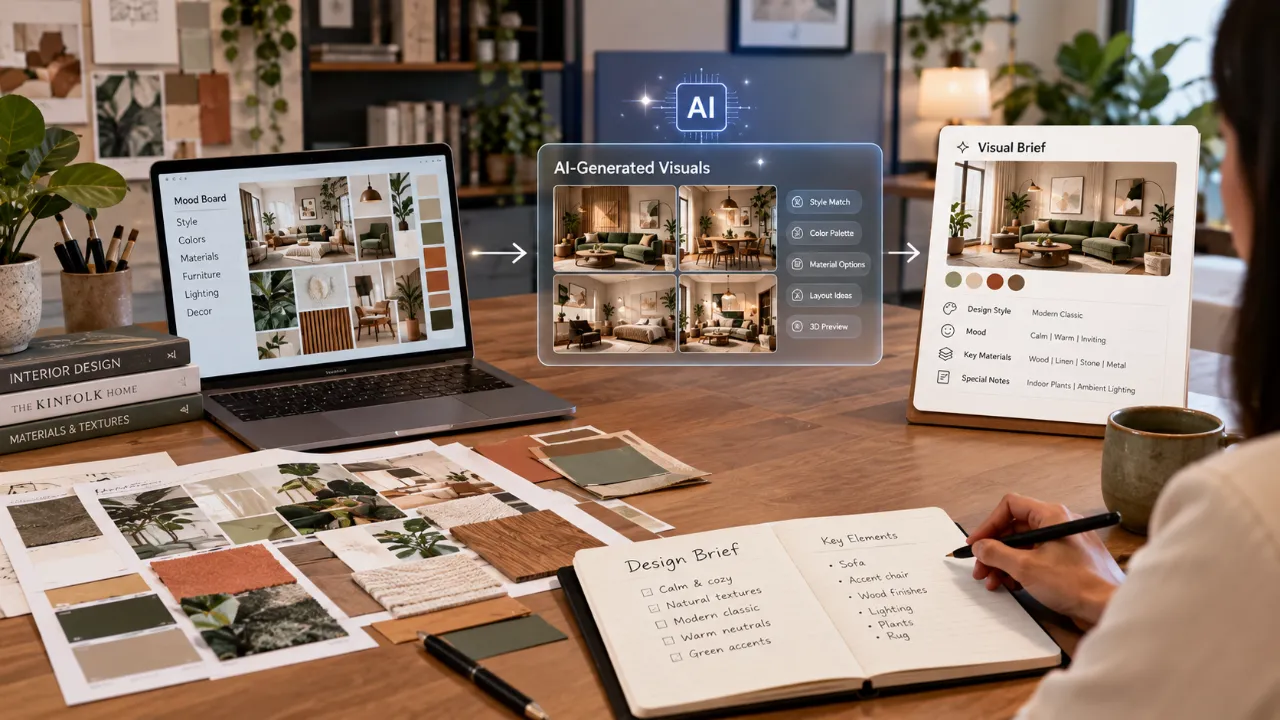
From Mood Boards to Visual Briefs: How AI Is Changing Designer Conversations
For years, briefing an interior designer often started with a collection of references.
A few Instagram saves. Some Pinterest images. A screenshot of a living room. A colour someone liked.
And then the inevitable sentence: “I want something like this, but I don't know exactly what.”
AI room visualisers are beginning to change that first conversation.
- From “I Like This” to “This Is What I Mean”
- Why your own room changes the brief
- How AI helps discover preferences
- Making feedback more concrete
- Comparing design directions
- Why a beautiful image is not a design specification
- What the designer still has to solve
- A better AI-assisted briefing workflow
- The future of client + AI + designer collaboration
From “I Like This” to “This Is What I Mean”
The biggest change is visual specificity.
A client can say, “I like warm modern interiors.” That tells a designer something, but not very much.
Now imagine the client also brings a visual showing warm wood, soft beige walls, a curved sofa, minimal built-ins, layered lighting and muted brass accents.
Suddenly, the conversation has more information.
The AI-generated image becomes a discussion object.
The designer can ask what the client likes about it, what they would change, which elements are essential and which are only visual inspiration.
AI Is Turning Mood Boards Into More Personal References
Traditional mood boards are powerful because they communicate atmosphere. But they often combine images from different homes.
A marble kitchen from one project, a sofa from another, a colour palette from a third image.
AI visualisation can put multiple preferences into a single room concept.
Instead of saying, “I like this flooring, this lighting and this sofa style,” the homeowner can explore what those preferences might look like together in their own space.
Your Own Room Changes the Brief
There is an important difference between saying, “I like this living room,” and “This is my living room, and this is the direction I am exploring.”
A room photograph can reveal existing windows, door positions, flooring, ceiling conditions, furniture that must stay, available wall space and other visual constraints.
Walls to Wonder's Design My Room workflow allows users to upload a room photograph, choose a room and style, customise colours, budget and focus areas, and generate a visual redesign for inspiration and discussion.
It Helps Clients Discover What They Actually Like
Sometimes people do not know their design preference until they see it.
Someone may think they want minimalist interiors and then realise that a warm timber palette, softer lighting and more texture feel better.
The value is not necessarily that AI “discovers” the perfect style. It gives the homeowner something concrete to react to.
The Brief Becomes More Specific
Traditional briefs often contain statements such as:
- “Modern but not too modern.”
- “Elegant but comfortable.”
- “Minimal but warm.”
- “Luxury but not flashy.”
AI-generated concepts can help convert these broad preferences into more specific visual language.
Modern + Warm
Warm timber, softer upholstery, layered neutrals and indirect lighting.
Minimal + Warm
Fewer furniture pieces balanced by texture, artwork and greenery.
Luxury + Understated
Natural stone, restrained metal accents and refined detailing.
Traditional + Contemporary
Traditional references interpreted through modern proportions and materials.
It Can Make Feedback More Concrete
Design feedback becomes difficult when it stays entirely verbal.
“Make the room feel softer.” “Something is missing.” “I don't like the wall.”
A visual reference gives the conversation somewhere to go.
A client can point to a generated concept and explain exactly which lighting, furniture, colour, storage or material direction they prefer.
AI Can Help Clients Compare Directions Before Committing
One of the biggest advantages is not creating one image. It is creating several possibilities.
| Direction | What the Client Can Learn |
|---|---|
| Warm Modern | Whether the balance of clean forms and softer materials feels right |
| Japandi | Whether restrained colour, natural materials and simplicity appeal |
| Contemporary Luxury | Whether richer materials and stronger contrast feel appropriate |
| Minimal | Whether reduced visual density actually suits the household |
| Traditional Indian | Whether traditional visual elements fit the desired atmosphere |
The purpose is not to choose a style label. It is to narrow the design direction before detailed work begins.
But a Beautiful Image Is Not a Design Specification
AI-generated visuals can be convincing. Convincing does not mean technically resolved.
An image may show:
- Furniture that does not fit the actual dimensions
- A staircase that could not be constructed that way
- A lighting fixture in an impractical location
- A window that does not exist
- Storage that looks elegant but cannot hold enough
- Materials that are difficult to source
- Joinery that ignores construction details
- Services that have not been considered
Research on AI-generated interior visualisation has also identified limitations in preserving precise spatial and furniture details, even when the outputs are useful for early communication and creativity.
AI Can Show the “What” Without Solving the “How”
A client can use AI to communicate: “This is the kind of room I want.”
The designer then has to determine whether it can actually fit, function, be built, be sourced and stay within the available budget.
Scale
Will the furniture actually fit?
Circulation
Can people move comfortably through the room?
Materials
Are the proposed finishes practical and available?
Budget
Can the concept realistically be delivered?
Lighting
Will the room work beyond the render?
Construction
Can the details actually be executed?
AI Can Change the Questions Designers Ask
When clients arrive with visual concepts, designers can spend less time trying to discover basic aesthetic preferences and more time testing those preferences against reality.
Instead of “What style do you like?”, the conversation can become, “You clearly prefer this visual language. Which parts matter most to you?”
The designer is not simply extracting a preference. They are interpreting it.
The Client's Role Becomes More Active
AI visualisers can allow homeowners to explore ideas before the formal design process begins.
That can create a more participatory process, while professional design expertise remains essential for evaluating feasibility, trade-offs and technical decisions.
It Can Surface Preferences the Client Did Not Know They Had
A client may not know how to describe why a room feels right.
But once several options are visible, patterns can emerge.
- Natural wood
- Rounded furniture
- Soft lighting
- Neutral colours
- Open shelves
- Large plants
From those choices, a more precise design direction can start to appear.
AI Makes the Brief More Iterative
That is closer to a conversation than a one-time questionnaire.
Why Visualisation Helps People Who Struggle With Design Vocabulary
Not everyone knows the difference between contemporary, modern, transitional, minimalist, Japandi, warm modern and modern classic.
A homeowner should not need professional vocabulary to communicate what they want.
“More Like This”
Show the direction that feels right.
“Less of That”
Identify elements that do not work.
“Keep This”
Highlight the features that matter most.
“Change This”
Make revision priorities visible.
AI Can Help Before the First Designer Meeting
A homeowner could prepare with:
- A clear photo of the current room
- Two or three visual concepts
- A preferred colour direction
- A list of things that must stay
- A list of things that should change
- A rough budget range
- A few practical priorities
That is already a much stronger starting brief than simply saying, “Please make it look nice.”
Too Many AI Images Can Create Noise
Generating twenty versions of the same room does not automatically create clarity.
It can create more confusion, especially when the homeowner starts collecting individual objects instead of identifying a coherent design direction.
The purpose of visualisation should be direction, not endless image collecting.
A Better AI-Assisted Briefing Workflow
1. Start With Your Real Room
Use a clear photo that gives enough context.
2. Explore a Few Directions
Test different styles, palettes or moods rather than generating endless variations.
3. Notice the Patterns
Identify what repeatedly appears in the versions you like.
4. Mark What You Dislike
Dislikes are useful design information too.
5. Take the Concepts to Your Designer
Use the visuals to explain the direction rather than dictating the final solution.
6. Let the Designer Test Feasibility
Dimensions, services, materials, budget and execution now enter the conversation.
The Best AI Brief Is Not the Prettiest One
The most photorealistic AI image is not necessarily the most useful.
A useful visual brief should communicate:
- Desired mood
- Preferred colours
- Material preferences
- Furniture direction
- Things to avoid
- Existing elements that must remain
- Practical priorities
An imperfect but clear visual can be more useful than a stunning image with no connection to the client's real priorities.
AI Can Help Designers Too
This shift is not necessarily only beneficial to clients.
Designers can receive clearer information, identify preferences faster, discuss trade-offs earlier and explore alternatives visually before committing to detailed design work.
Research into generative AI in architectural design shows that current use is heavily concentrated in early design stages, with images representing a dominant input and output format.
What Designers Still Need to Bring
| AI Can Help With | Professional Design Still Needs to Resolve |
|---|---|
| Visual exploration | Actual dimensions and spatial feasibility |
| Style discovery | Functional planning |
| Colour and material direction | Material specifications and sourcing |
| Concept comparison | Budget and cost implications |
| Early visual feedback | Technical drawings and detailing |
| Preference exploration | Construction, services and execution |
| Atmospheric inspiration | Long-term practicality and maintenance |
The New Brief Is Becoming More Visual
The traditional design brief was primarily verbal.
Then came mood boards. Then digital inspiration boards. Now, AI makes it possible to generate a visual concept from the homeowner's own room and preferences.
That does not make the designer less important. It can make the designer-client conversation more informed.
The Future May Be Less About “AI vs Designers”
The more interesting possibility is AI + designer + client.
Client → Vision
Brings lived experience, preferences, priorities and constraints.
AI → Exploration
Turns those inputs into fast visual possibilities for discussion.
Designer → Resolution
Interprets, challenges, refines and technically resolves the concept.
That is a more useful way to think about AI in interiors than treating it as a replacement for design professionals.
Walls to Wonder — Design My Room
Sketchterior — AI visualisation for early interior-design communication
AIDED — Designer–AI co-design and client experience data
AI and human collaboration in conceptual design
Generative AI in architectural design — systematic review
Start With Your Space
Before your next design conversation, turn your existing room and preferences into a visual starting point.
Try Design My Room, estimate your Interior Design Cost, or explore Interior Designers.
The Final Takeaway
AI room visualisers are changing the way people brief designers because they make the first conversation more visual, interactive and specific.
A homeowner can start with an actual room instead of a vague idea, test different directions, discover preferences and arrive with a clearer set of priorities.
But the most useful AI visual is not the one that looks most impressive.
That is the question a good AI-assisted brief should help the homeowner and designer answer together.
Frequently Asked Questions
Yes. It can help you explore styles, colours, furniture directions and room concepts before the first design consultation.
No. A generated image can support early visual exploration, but professional design still needs to address dimensions, function, materials, services, budget, detailing and execution.
Show the concepts you like, the elements you want to keep, the elements you dislike and the patterns you notice across different versions.
Not necessarily. A small number of clearly differentiated concepts can be more useful than a large collection of similar images.
Include your existing-room photo, preferred style direction, colours, materials, must-keep elements, elements you want changed, practical requirements and approximate budget.
AI visuals can be conceptually useful while still overlooking actual dimensions, structure, services, material specifications, construction details, sourcing and other project constraints.
Turn this idea into a plan for your home
Visualise your space, understand the likely budget, or find a professional who can bring the idea to life.