
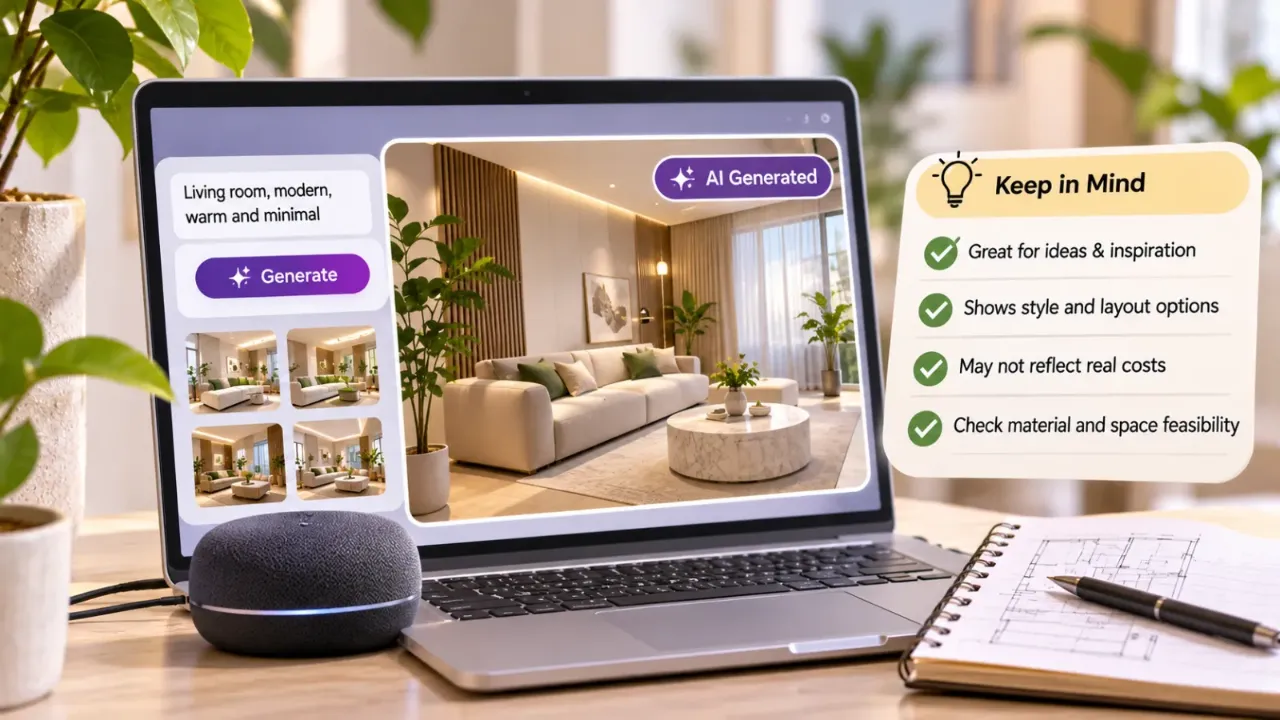
AI-Generated Interior Images: What Owners Should Know About Using Them
AI-generated interior images have made it easier for homeowners to explore design ideas before committing to a renovation. With a photograph of a room and a few instructions, an AI tool can produce different colour schemes, furniture arrangements, lighting concepts and interior styles in a short time.
For someone planning a new home or updating an existing one, this can be a useful starting point. You can compare a warm minimalist living room with a contemporary one, experiment with kitchen finishes or see how a different wall colour might change the mood of a bedroom.
However, an attractive AI image is not necessarily a practical design. It may change the room's proportions, show furniture that does not exist, invent materials or ignore important construction details. Before using one to guide purchases or renovation work, homeowners should understand what the image can—and cannot—tell them.
1. Understand What an AI-Generated Interior Image Is
An AI-generated interior image is a visual created or modified using an artificial intelligence tool. Depending on the tool, you may be able to generate a room from a written description, transform an uploaded photograph or explore alternative versions of an existing space.
For example, you might upload a photograph of your living room and request:
- A modern Indian living room with warm wooden finishes.
- A neutral colour palette with subtle accent colours.
- A compact TV unit with additional storage.
- A contemporary false ceiling with layered lighting.
- A more open-looking furniture arrangement.
The tool uses your instructions and the information it can interpret from the image to produce a visual concept.
Not all tools work in the same way. Some primarily generate images from text, while others use an existing photograph, floor plan or 3D model as a reference. The more closely a tool understands the actual geometry of the room, the more useful it may be for certain planning tasks. Even then, its output needs to be checked.
2. Use AI Images for Inspiration, Not as Final Design Drawings
One of the biggest mistakes homeowners can make is treating a realistic-looking image as an approved design.
An AI visual can help you communicate the kind of room you like. It can show the general mood, colour direction, furniture style and decorative approach. But it does not automatically provide the information required to execute that design.
For example, an image of a beautiful modular kitchen does not tell you:
- The exact cabinet dimensions.
- The required shutter thickness.
- The internal storage layout.
- The hardware specifications.
- The plumbing and electrical requirements.
- The actual countertop material or edge profile.
- Whether the layout fits the available space.
These details need proper measurements, specifications and design documentation.
Think of an AI image as a visual reference that starts a conversation. It should not replace the drawings, measurements and technical decisions needed for construction.
3. Know What AI Images Can Help You Explore
AI visualisation can be particularly useful during the early stages of interior planning, when you are still deciding what you want.
Colour combinations
You can compare combinations such as ivory and walnut, beige and olive, or grey and natural wood. This helps you narrow down a preferred direction before ordering physical samples.
Furniture styles
Explore different sofa shapes, bed designs, dining tables, TV units and storage styles. This can help you explain your preferences to a designer or furniture supplier.
Interior themes
Try contemporary, minimalist, Scandinavian, industrial, traditional Indian or transitional design directions. You can compare the overall atmosphere without immediately changing the room.
Decorative elements
Experiment with wall panelling, artwork, rugs, curtains, mirrors, lighting and accessories. These are often useful areas for visual exploration because they can change the appearance of a room without necessarily requiring major structural work.
Before-and-after concepts
If a tool supports image transformation, you can use an existing room photograph to explore possible changes. This is particularly helpful when you want to retain the basic room but update its appearance.
The key is to use the image to make decisions about visual preferences, not to assume that every object or detail shown is available or suitable.
4. Be Careful About Room Dimensions and Proportions
AI-generated images can make rooms look larger, wider or taller than they actually are. Furniture may appear smaller, walkways may seem more spacious and storage units may fit into spaces that cannot accommodate them in reality.
This is especially important in compact Indian apartments, where circulation space, door openings, columns and fixed services can influence the layout.
Before accepting a generated layout, check:
- Actual wall lengths and room dimensions.
- Door and window positions.
- Ceiling height and beam locations.
- Furniture width, depth and height.
- Space required to open drawers, shutters and doors.
- Clearances around beds, dining tables and sofas.
- Walking paths between furniture and entrances.
For example, an AI image may show a large L-shaped sofa in a small living room. The image might look balanced, but the actual sofa could obstruct the balcony door or leave insufficient space to move around the room.
Measure the room and compare the proposed furniture dimensions before making a purchase.
5. Do Not Assume the Materials in the Image Are Real Products
AI tools can create convincing wood grains, marble patterns, tiles, fabrics, metal finishes and decorative surfaces. However, the appearance of a material in a generated image does not confirm that an identical product exists in the market.
A countertop may look like natural marble when the intended practical choice is engineered stone. A wooden panel may resemble a particular veneer, laminate or solid-wood finish without identifying any real product.
Before finalising a material, ask for:
- The actual product or material name.
- Manufacturer and product range, where applicable.
- Finish, colour and surface texture.
- Thickness and dimensions.
- Maintenance requirements.
- Warranty and installation conditions.
- Current price and availability.
Request physical samples whenever possible. View them under the lighting conditions in which they will be used. A finish that looks subtle on a screen may appear much darker, glossier or more textured in the actual room.
6. Understand How AI Can Change Existing Room Features
When you upload a photograph of your home, an AI tool may alter details that you wanted to preserve.
For example, it might:
- Move or resize a window.
- Change the shape of a doorway.
- Remove a column or beam from the visual.
- Alter the ceiling height.
- Replace the original flooring.
- Change the position of electrical points.
- Add cabinetry where a structural or service constraint exists.
This can happen even when your instructions ask the tool to retain the original layout.
If you want to keep certain features unchanged, mention them clearly in your instructions. You can specify that the existing doors, windows, columns, flooring, room proportions or furniture structure must remain as they are.
After generating the image, compare it with the original photograph. Do not assume that the tool has followed every instruction accurately.
7. Check Lighting and Colours in Real Conditions
Lighting is one of the most visually appealing parts of AI-generated interior images, but it can also be misleading.
A generated image may show soft sunlight, glowing ceiling details, perfectly balanced shadows and warm ambient lighting. Your actual room may have a different window orientation, limited daylight or existing electrical points that restrict the lighting arrangement.
Similarly, colours can appear different on a phone, laptop or tablet screen.
Before finalising a colour or lighting plan:
- Check paint samples on the actual wall.
- View finishes in both daylight and artificial light.
- Consider the direction and amount of natural light.
- Check the colour temperature of proposed light sources.
- Confirm fixture positions and electrical requirements.
- Test fabric and surface samples in the room.
A colour that appears warm and inviting in an AI image may look dull in a north-facing room or overly yellow under warm artificial lighting.
8. Do Not Use AI Images to Approve Structural or Technical Changes
A generated image cannot establish whether a proposed construction change is safe or permitted.
It may show an open-plan living room created by removing a wall, a floating staircase, a larger window or a redesigned balcony. But the image does not confirm whether the change is structurally possible.
Do not use AI-generated visuals as approval for:
- Removing or modifying walls.
- Altering beams, columns or slabs.
- Changing balcony structures.
- Modifying plumbing or drainage routes.
- Relocating electrical installations.
- Changing waterproofing or other critical building systems.
These decisions require site inspection, appropriate drawings and assessment by qualified professionals. Building permissions and applicable safety requirements must also be considered.
Use AI to explore how a space might look after an approved change, not to decide whether the change can be made.
9. Be Careful When Sharing Photographs of Your Home
Many AI interior tools allow users to upload photographs of their rooms. Before doing so, understand how the platform handles uploaded images and other personal information.
A room photograph may reveal more than its furniture and wall colours. It could include family photographs, personal belongings, documents, security devices, a visible address or details about the layout of your home.
Before uploading:
- Read the tool's privacy policy and data-use terms.
- Check whether uploaded images may be stored or used to improve services.
- Remove visible personal documents and identifying details.
- Avoid sharing photographs that reveal sensitive security arrangements.
- Check whether the tool offers deletion or account-data controls.
- Use a trusted platform rather than an unfamiliar website.
If you are uploading photographs on behalf of another household member or client, obtain their permission first.
The convenience of visualisation should not come at the cost of sharing information you would prefer to keep private.
10. Check Usage Rights Before Sharing or Publishing AI Images
Homeowners may want to share their generated room images on social media, in a renovation portfolio or with a contractor. Interior designers and businesses may also use AI visuals in proposals and promotional material.
Before using an image publicly or commercially, read the terms of the AI tool you used. Check whether the platform permits the intended use, whether attribution is required and whether any restrictions apply to commercial publication.
Also consider the source material. If you uploaded a photograph taken by someone else, or used a protected design image as a reference, you may need permission to use that material. Generating a new-looking image does not automatically remove rights associated with the original content.
In India, copyright questions involving AI-generated works and the use of copyrighted material remain an evolving area. The Government has discussed the application of the existing copyright framework to AI, while further policy work has examined questions around training material and ownership of AI outputs.
For important commercial projects, get appropriate legal advice rather than assuming that every generated image is free to use without restrictions.
11. Ask Designers and Vendors to Explain AI-Generated Visuals
If an interior designer or vendor presents an AI-generated image as part of a proposal, ask how it relates to the actual project.
Useful questions include:
- Is this image AI-generated, a 3D render or a photograph of a completed project?
- Does it represent my actual room dimensions?
- Which elements are proposed and which are only illustrative?
- Are the products and materials shown available?
- Can you provide the actual material specifications?
- Will I receive detailed drawings before execution?
- Does the quotation cover everything shown in the visual?
- Which parts may change because of site conditions or budget?
A visual should not create the impression that a particular finish, product or result is guaranteed if it has not been specified or confirmed.
If a business uses AI-generated images in advertisements or service presentations, it should avoid presenting a concept as a completed project or making claims that could mislead customers. Clear explanations help homeowners understand what they are being shown.
12. Turn Your Favourite AI Image Into a Practical Design Brief
Once you have explored different options, select the images that communicate your preferences most clearly. Instead of treating them as instructions for a contractor, use them to prepare a brief for your designer.
Your brief can include:
- Original photographs of the room.
- Selected AI-generated reference images.
- Preferred colour palette and interior style.
- Furniture and storage requirements.
- Materials and finishes you want to explore.
- Existing features that must remain unchanged.
- Actual room measurements and floor plans.
- Budget range and project priorities.
- Any functional or maintenance requirements.
Discuss the brief with your interior designer. Ask them to translate the visual direction into suitable layouts, drawings, material specifications and a realistic project estimate.
This step connects the initial inspiration with the practical requirements of renovation.
13. A Homeowner's Checklist Before Relying on an AI Interior Image
Before using an AI-generated visual to make a design or purchasing decision, check the following:
- The image is clearly identified as AI-generated or illustrative.
- The original room layout has been compared with the generated version.
- Actual room and furniture dimensions have been measured.
- Doors, windows, columns and other fixed elements have been checked.
- Materials and finishes have been identified separately.
- Product availability and pricing have been confirmed.
- Lighting and colours have been reviewed using real samples.
- Structural and technical changes have been assessed by qualified professionals.
- The AI tool's privacy and usage terms have been reviewed.
- Usage permissions have been checked before public or commercial sharing.
- Detailed drawings and specifications will be prepared before execution.
Closing Thoughts
AI-generated interior images can make the early stages of home planning more engaging. They help homeowners explore styles, compare finishes and communicate ideas that may otherwise be difficult to explain.
But a beautiful image is only one part of a successful interior project. Real measurements, suitable materials, functional layouts, technical drawings and professional judgement are what turn an idea into a usable home.
Use AI to discover what you like, ask questions about what you see and verify every important detail before spending money or beginning work. The best results come when visual creativity is supported by practical planning.
Explore More with Walls to Wonder
Planning your interiors becomes easier when you can explore ideas, compare styles and understand the likely costs before making decisions. Discover the Walls to Wonder AI tools:
- Whole Home Visualizer
- Design My Room
- Interior Design Cost Estimate
- Interior Quotation Checker
- Rate My Room Design
- Interior Style Finder
Visit Walls to Wonder to explore more tools and ideas for your home.
Turn this idea into a plan for your home
Visualise your space, understand the likely budget, or find a professional who can bring the idea to life.